
Pay once, keep it.
No monthly fee, no "Pro" tier, no AI upsell. Sync through our server is included.

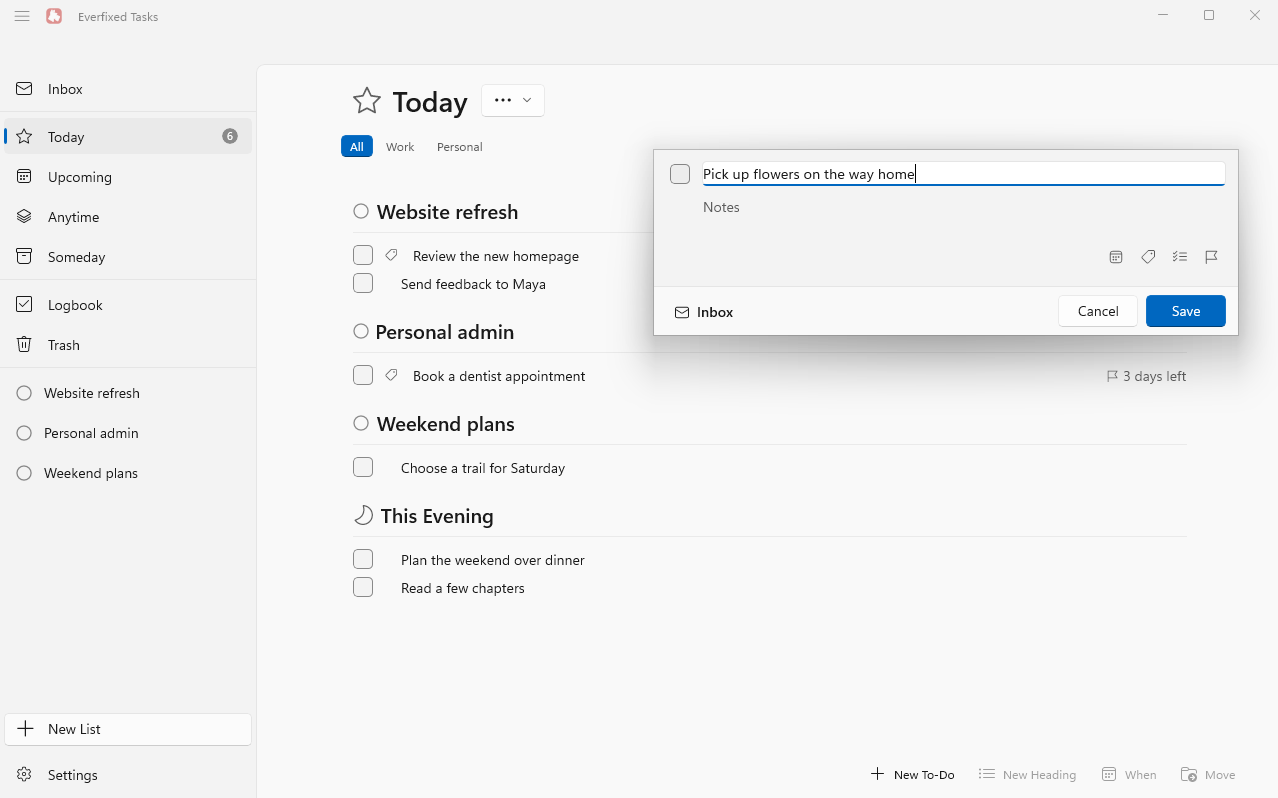
Inbox, Today, Upcoming, Anytime, Someday. Projects, areas, tags, Logbook. Fast, quiet, keyboard-first.
$9.99 once, no subscription.
Switched to a PC — or got a Windows laptop at work — and left your favourite to-do app behind? We're building the Windows app that works the way you're used to: the same views, the same keyboard flow, the same one-time price.
On your phone? Leave your e-mail and we'll write when you can install it on your PC.
We're aiming for a beta before the end of 2026; the launch list gets it first.
No monthly fee, no "Pro" tier, no AI upsell. Sync through our server is included.
Capture to Inbox, pick Today, let the rest wait in Upcoming or Someday. Nothing nags you.
Your data lives on your PC and works without a network. No trackers, no Google or Microsoft account. Sync through our server or run your own.
Tired of price hikes and features you didn't ask for? Everfixed Tasks is a plain, fast task manager: no subscription, no AI suggestions, no sync to babysit. Projects, tags, repeating tasks, deadlines — and nothing else.
Inbox, Today with This Evening, Upcoming, Anytime, Someday and Logbook. Projects with headings and a progress ring, areas to group them, tags, deadlines, repeating to-dos, checklists and Markdown notes.
Quick Entry opens on a global hotkey on top of whatever you're doing and saves straight to your Inbox. Everfixed Tasks is a Windows Share Target: send a link or text to it from any app. A small Android companion sends links and text from your phone into the same Inbox.
Everything reachable without the mouse: jump between lists with Ctrl+1…6, Type Travel to any list, project or tag by typing its name, search every to-do with Quick Find, set dates and deadlines with shortcuts, work through a list with arrow keys. Deleted to-dos wait in Trash.
Reminders arrive as Windows notifications. Events from your Windows or Outlook calendar show up in Today and Upcoming next to your to-dos, so one list tells you what the day holds.
Drag to-dos between lists, into projects and onto dates in the sidebar. Drop the Magic Plus button where a new to-do should go and it's created right there.
A real Windows app built on WinUI 3 and compiled ahead of time, not a web page in a wrapper. Follows your light or dark theme, lives in the tray, offers Windows widgets. Your to-dos sync between your Windows PCs, and the Android companion keeps your phone in the loop.
No assistant built in. Instead, a command-line tool with --json output and ready-made skills,
so whichever agent you already use can read and change your to-dos on your terms.
Why not an MCP server? We don't think it's a good use of your tokens or your PC: it keeps running and sits in your agent's context whether you need it or not. The CLI and the skill start only when your agent needs them.
We work on Windows PCs and never found a calm, native task manager on them in the league of Things, so we started building one. Lists and keyboard control already work and get daily use from us while the rest takes shape. Questions, doubts or wishes: hello@everfixed.app.
Your to-dos live on your PC and the app works without a network, so it keeps working. Sync runs on our server, and you can run the same server yourself.
No. Everfixed Tasks is for Windows. On Android there is a small companion that sends links and text into your Inbox.
Not in the first version. An importer may come later; the launch list will hear about it first.
No. Nothing to sign in to for the app itself; sync needs only the server, ours or yours.
We're aiming for a beta before the end of 2026. Leave your e-mail and we'll send one message when it's ready.
$9.99 one-time purchase
That's the price we're planning for early access on Windows: pay once, no subscription. Does it sound fair? Signing up tells us more than any survey.
Leave your e-mail and we'll send one message when Everfixed Tasks is ready for Windows.
Thanks. We'll e-mail you once, when Everfixed Tasks is ready for Windows.
One more thing: what do you use for tasks today?
You're on the list. Thanks!